GKC product
Data Discovery
Find answers across your document archive, with citations to the supporting material. Data Discovery is a Windows application that keeps your original files unchanged.
Available for demonstrations and pilot discussions.
Beyond knowing which folder to open.
Keyword search helps when you know the wording. Semantic search helps find passages related to the meaning of a question. Data Discovery builds both kinds of index from a document collection.
Answers include citations so you can open the supporting material and review it in context.
The answer is usually the attachment.
Email search that stops at the message body misses the thing you are looking for. The decision is in the spreadsheet someone attached in 2019, not in the two lines of covering text.
Data Discovery decodes supported attachments and indexes them as documents in their own right. An attachment is its own citation, carrying a reference back to the message it arrived with, and an evidence copy is the original decoded file rather than a converted version of it.
An answer with evidence to review.
Ask a question, read the answer and follow the citations to the material behind it. The matching passages provide the context for the response.
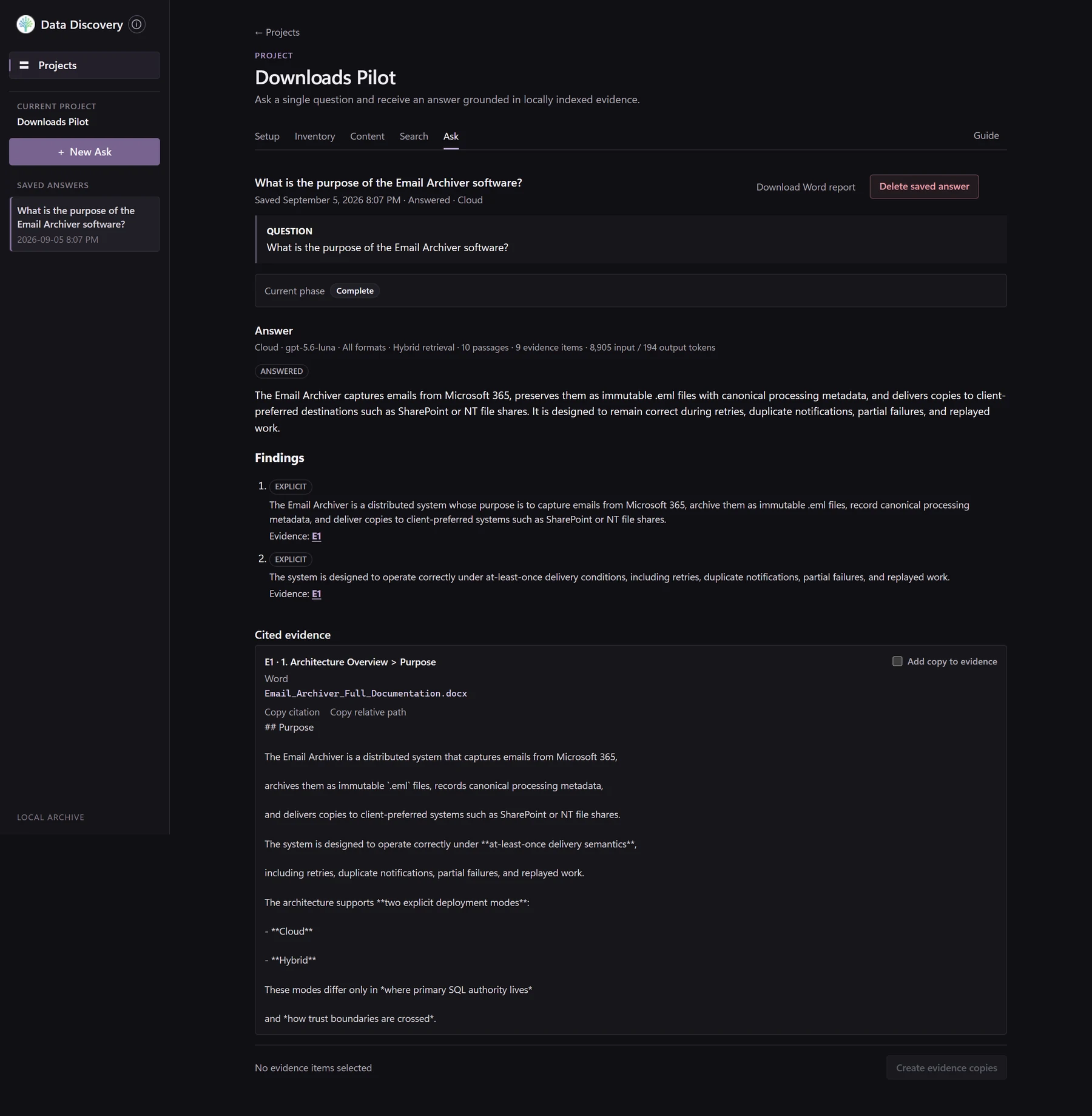 See the full answer
Working with a collection
For project records, reports, engineering documents and other archives held across supported file formats.
A collection is any folder the machine can reach: a local drive, an external disk, or a synced OneDrive or SharePoint library. One thing to plan for with a synced library — Windows downloads online-only files the moment anything reads them, so processing will pull that content onto the disk. That is how Files On-Demand works rather than anything Data Discovery decides, but the disk space is worth checking first.
- Select a document collection
- Inventory the files
- Process supported content
- Build keyword and semantic indexes
- Search or ask a question
- Review the cited source evidence
Your archive is not what gets sent.
Indexing and retrieval always run on your own machine. Documents are embedded locally with a pinned, checksummed Nomic model on ONNX Runtime, optionally on the GPU through DirectML with no CUDA install required.
Only a generated answer sends anything out, and only your question and the passages already selected as evidence. Source files and document paths are never sent, the application asks you to acknowledge the exchange before it happens, and those passages are the ones cited beneath the answer. You can see exactly what went.
Answers can also be generated locally through LM Studio, which you install and run yourself. That is the fully private option, but a local model needs enough GPU to hold both the evidence and the response, and most machines do not have it. That constraint is why retrieval stays local rather than the whole pipeline.
If a chosen provider is unavailable, Data Discovery stops and explains what needs attention. It never switches providers on its own.
Answers keep their paperwork.
A saved answer is a record rather than a chat message. The question, the answer, the findings and the cited evidence stay with the project, and reopening one does not call the model again or reopen the source documents. What you saved in August is what you read in March.
Mark any cited document and Data Discovery copies the original into an evidence folder and writes a line to a ledger: the question that produced it, when the answer was saved, when the copy was made, whether it came from a source document or an email attachment, and a stable identifier for the item itself. Cite the same attachment from three separate questions and it is copied once, under one identifier, recorded three times. Each saved answer can also be exported as a Word report with its cited evidence.
That is a chain of custody. Answering a records request, assembling a claim or preparing for an audit takes more than an answer: it takes the documents behind it and a record showing how one led to the other.
See Data Discovery in use.
Arrange a demonstration or discuss a pilot around your document collection and the questions your team needs to answer.